
- Offers
- Service providers
- Knowledge base
- Tools
- Arena
- Contact
- Partners
EN
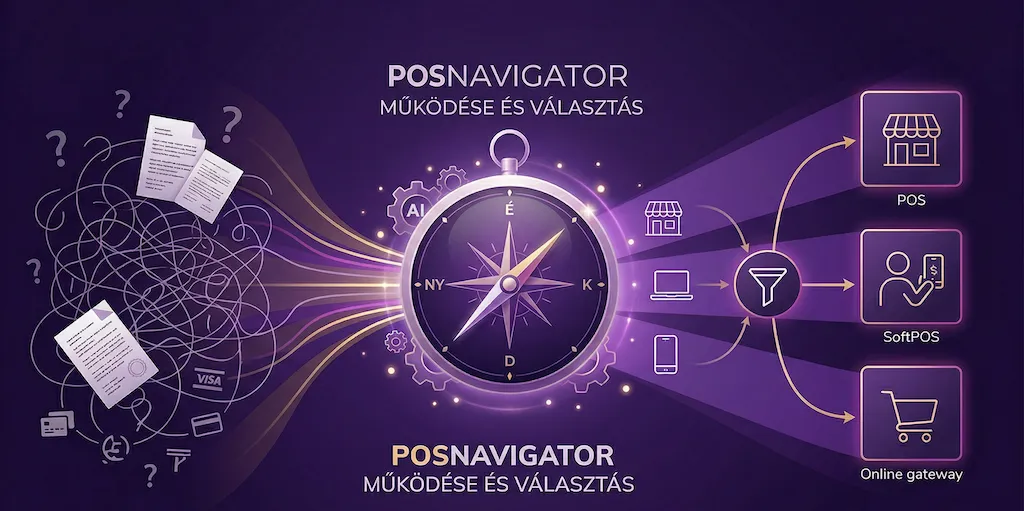
If you are looking for a new payment provider, it is easy to get lost between bank offers, fintech landing pages, and a lot of fine print. POSnavigator helps you evaluate payment solutions based on how your business actually operates, not just on marketing claims. This article explains how POSnavigator works for merchants, step by step, based on the platform state as of April 2, 2026.
If you want a shorter introduction first, you can read our earlier summary article, How does POSnavigator work?. This guide goes much deeper: it explains what kind of business data the platform asks for, how it narrows down the available offers, how it estimates costs, and how merchants should interpret the results.
POSnavigator is a decision-support platform built for merchants who want to compare payment solutions available in Hungary. It does not only cover classic POS terminals. It can also help you think through solutions such as a SoftPOS app, online payment gateways, and instant-payment-based methods such as qvik instant payment.
The goal of the platform is not to make the decision for you. The goal is to make the choice more transparent. For most merchants, the real question is not “which provider is the most famous?” but “which solution fits my turnover, customer base, business model, and cost structure?” POSnavigator is designed to give a practical answer to that question.
The platform is especially useful for merchants who:
are introducing card acceptance or online payments for the first time,
already have a provider but want to see whether there is a better or better-fitting alternative,
want to compare not only pricing, but also features, contract logic, and real operational differences,
want to separate in-store, mobile, and online acceptance needs,
need an objective starting point before negotiating with a bank or payment provider.
It becomes even more useful if you operate across multiple channels. For example, you may have a physical store, but you also deliver orders, or you may already run a store and now want to launch a webshop. In those situations, the right answer is often not one single “POS terminal”, but a combination of payment solutions.
To show relevant offers, the platform first has to understand how your business works. That is why the process starts with a few core business inputs and preference questions. In practice, these usually revolve around:
what kind of business you run,
whether you need to accept payments in-store, on the go, online, or in more than one channel,
your expected monthly turnover,
your average transaction size,
which payment methods matter to you, such as Mastercard, Visa, mobile wallets, or qvik instant payment,
whether capabilities such as instant settlement, a rental POS terminal, or a purchasable POS terminal are important for you,
whether you need webshop or technical integrations, for example in a Shopify environment.
This is an important difference compared with a standard provider landing page. On most provider sites, you are the one trying to figure out whether a generic commercial offer fits your situation. POSnavigator turns that around: it starts with your business context, then shows relevant options.
An important part of the current POSnavigator experience is the AI-assisted entry flow on the homepage. You do not have to start only from fixed buttons or rigid categories. There is a CTA box where you can briefly describe what kind of payment solution you are looking for in your own words. For example, you can say that you run a restaurant, a courier business, a webshop, or a small low-turnover shop looking for a terminal.
That free-text input starts a short AI conversation. The assistant asks a few targeted questions to understand your situation better, then moves you toward the wizard in a more prepared state. In practice, this means the merchant is not sent into a completely empty wizard. Key parts of the flow can already be prefilled or preselected based on what the AI learned from the conversation.
This is especially useful when the merchant understands their own business very well, but does not necessarily know how payment-industry fields are structured. Based on the merchant’s free-text activity description, the system can help prefill elements such as the MCC code or the merchant profile. In other words, the assistant helps translate everyday business language into the structured fields the wizard needs.
That is a strong product feature because many merchants do not arrive as payments experts. They can usually explain clearly what they do and how they sell, but they may not know which MCC code fits their activity, or how payment providers would categorize their business. The AI assistant helps at exactly that first interpretation layer.
It is also important to understand what the AI does not do. It does not replace the wizard and it does not make the final decision on behalf of the merchant. Its role is to prepare the flow: collect the important context, prefill the relevant fields, and make the wizard feel faster, less technical, and easier to complete.
The first layer of filtering is not provider-based. It is use-case-based. The platform first tries to determine whether your real-world situation points more toward in-store card acceptance, mobile acceptance, online payments, or a combination of these.
That matters because the right solution is very different for a restaurant, a salon, a courier, or a webshop. A hospitality venue usually needs a reliable physical terminal and often some kind of cash register integration. A mobile service business may be better served by a phone-based SoftPOS app. A webshop usually cares more about checkout flow, integrations, and refund logic.
If you are still unsure which category fits you, our article POS Terminal vs. SoftPOS vs. Payment Gateway is a useful companion read because it also makes the platform results easier to interpret.
Once you provide your main requirements, the platform filters down to the providers and products that are realistically relevant for you. That means different merchants do not see the same list. Someone looking only for an in-store terminal can get a different result set from someone looking for mobile acceptance or webshop payments.
The results may include bank-led players such as OTP Bank or MBH Bank, alongside independent providers and fintech companies. One of the practical strengths of POSnavigator is that it is not limited to a single bank universe. Different commercial models can appear side by side.
That is valuable because the Hungarian payments market is not naturally presented on a common basis. Even before you look at detailed pricing, POSnavigator already does part of the heavy lifting by helping you identify which providers are worth considering at all.
A raw list is not enough. The real value begins when providers and products become comparable under common decision criteria. POSnavigator helps with that by showing not just names, but the characteristics that actually matter during merchant decision-making.
Those can include:
which payment channels the solution supports,
whether it offers a physical terminal, phone-based acceptance, or an online gateway,
which relevant features are available,
how transparent the pricing is,
whether cost estimation is available based on the data you entered,
whether there are integrations or technical details that are especially important in your business context.
This matters because most merchants are not actually looking for “the cheapest provider” in the abstract. They are looking for the best fit at an acceptable total cost. A slightly cheaper solution that is slow to deploy or hard to integrate can easily turn into the more expensive business decision.
One of the strongest parts of the platform is that, for certain offers, it can estimate expected merchant cost. This is more than simply showing a percentage fee. The platform uses the business inputs you provide to estimate what a given solution may cost in your real operating model.
According to POSnavigator’s own explanation, the estimate is based on your stated turnover, average transaction size, and customer composition, while also considering a typical Hungarian bank-card mix. This is especially important for pricing structures where the total merchant cost is not a single flat rate, but a combination of several cost elements.
If you want to understand the methodology in more detail, read How do we calculate the cost of payment methods?. It explains why looking at only one transaction-fee number is rarely enough.
This is one of the most important things to understand correctly as a merchant. POSnavigator does not claim to replace the final provider offer or to issue a guaranteed contractual price. The cost output is an estimate built from public or structured pricing information. That still makes it useful, because it gives you direction without pretending to be a signed commercial agreement.
The estimate is particularly useful for understanding order-of-magnitude differences. If two solutions show a major annual or monthly difference on your numbers, that is already a meaningful decision signal. But if two options are very close, then contract terms, support quality, implementation speed, and integration fit may become more important than the pricing estimate itself.
It is also important that the platform cannot estimate the cost of every single offer. If a provider only gives fully custom pricing, or does not publish enough information about its fee logic, POSnavigator can still help by showing whether that provider is worth contacting in the first place.
The practical value of the platform becomes clear when you no longer have to keep twenty names in your head. Instead, you can narrow down the market to a small number of serious options. The goal is not always to choose a single winner immediately. The goal is often to create a sensible shortlist.
A strong shortlist usually contains two to four solutions. At that point, it becomes realistic to compare:
the overall cost level,
speed of implementation,
technical fit,
contract logic,
and how transparent and workable the commercial model feels.
That is already a manageable decision environment, and this is exactly what many merchants miss in practice: there is no shortage of information, but there is a shortage of structured, comparable information.
Once you identify the options you want to explore further, the next step is offer request or direct contact. Based on the earlier short POSnavigator article and the platform’s own description, this can happen in two ways:
in some cases, you continue directly with the selected provider,
in other cases, the lead or order process can move forward through the platform flow.
If the provider supports ordering or lead handling through POSnavigator, the next stage typically happens between you and the provider: they contact you, clarify open questions, finalize the commercial offer, and then the contracting and onboarding process can begin.
That is an important distinction. POSnavigator’s role is primarily to structure the decision and improve the quality of merchant preparation, not to replace the provider’s own commercial onboarding process.
The result list is most useful when you do not focus only on which option appears first. To interpret it well, it helps to work through a few practical questions:
Is this solution actually strong in the channel where most of your turnover happens?
Does the estimated cost still make sense on your actual numbers, or does it only look attractive at first glance?
Is there a feature that is critical for you but less visible in the ranking, such as integration depth, fast settlement, or mobility?
Are you looking at public pricing or a custom-quote model?
Is the provider more suitable for smaller starting merchants, or does it become more competitive at higher volume?
This is important because POSnavigator does not give a simplistic black-and-white answer. It gives you a decision framework. That makes the platform more professionally useful, but it also means the merchant has to read the results consciously.
The platform is not magic, and it is better to treat it that way. There are a few limits merchants should keep in mind:
the cost calculation is an estimate, not a final contractual price,
not every provider publishes enough data for a full cost model,
in some merchant-specific cases, the final negotiated offer can end up better or worse than the estimate,
the platform works best when the information you enter is realistic and accurate.
In other words, POSnavigator does not replace merchant judgment. It accelerates it and puts it on a better foundation. For most merchants, that should be seen as a strength, not a limitation.
In practice, it tends to be most valuable in four situations:
Before first implementation. It helps you avoid starting in the wrong product category.
Before switching providers. If you already have a benchmark, the platform helps you check whether there is a better direction.
In multi-channel setups. If you may need in-store, mobile, and online acceptance, the platform helps separate those use cases clearly.
Before negotiation. Even if you do not choose the first option you see on the platform, it helps you go into provider discussions with better questions and a clearer frame of reference.
If you want the results to be genuinely useful, it is worth collecting a few core inputs in advance:
estimated or actual monthly card turnover,
average basket value or transaction size,
how your turnover is split between in-store, mobile, and online channels,
whether you need webshop integrations,
whether you need specific capabilities such as fast settlement or terminal ownership,
what pain point you are trying to solve compared with your current setup.
The more accurate your input, the more useful the shortlist becomes. If you provide only rough, generic information, the output will also stay more generic.
POSnavigator is not just a wizard for finding offers. It also has several menu sections that are useful even if you already have a payment provider, or if you want to understand the market better before asking for offers.
One of the most practical features is the Your current fees section. Here, a merchant can record the fees they currently pay under an existing contract or provider quote. This is especially useful if you are not entering the market for the first time, but already have a POS terminal, online gateway, or another payment setup and want to understand how competitive your current pricing really is.
Once those fees are entered, POSnavigator can calculate the estimated total cost over four years, using logic similar to its other cost-calculation tools. That long-term view is useful because it moves the comparison beyond a single monthly fee or one headline commission rate. It gives the merchant a more realistic view of the overall business impact. Those current-cost calculations can then be compared with the offers available on POSnavigator, so you can see not only what you pay today, but also what the upside or downside of switching may look like.
The Providers section works more like a market and knowledge map. Here, merchants can learn more about card schemes and payment systems such as Mastercard, Visa, or qvik instant payment.
The same area also includes lists of payment service providers, their main characteristics, and the typical IT partners that can help merchants implement or support payment-related integrations. This is particularly valuable if you are building a webshop, integrating a cash register or ERP environment, or working in a setup where payments are only one part of a broader operational workflow.
The Arena section gives a fast ranking-style overview of the market. It helps merchants see which offers currently look strongest in major categories for a typical merchant profile. For example, it can highlight which providers appear most attractive in categories such as SoftPOS app, starter webshop, or small retail shop scenarios.
This is not meant to replace the full personalized decision flow. It is better understood as a quick benchmark. It is especially useful when you want a rapid view of the strongest players in a segment before going deeper. One of Arena’s advantages is that the ranking can keep evolving as providers update their own pricing and offer structures.
It is important that in the Arena we can rank service providers not only based on cost but also on the "POSnavigator score": this allows us to get a quick overview of which services have the richest functionality.
The Knowledge Base is not just a collection of blog posts. It is also where merchants can learn the key concepts, technologies, and decision criteria behind payment services. If a fee model, payment scheme, device category, or feature is unclear, this is one of the best starting points inside the platform.
That matters because better provider selection often does not begin with “which offer is cheapest?” It begins with a clearer understanding of what the merchant is actually choosing between. In that sense, the Knowledge Base is one of POSnavigator’s most important supporting features.
No. POSnavigator is not a bank and not a payment gateway. It is a decision-support and comparison platform built to help merchants understand their payment options and likely costs more clearly.
No. The platform goes beyond classic POS terminals. It also helps merchants think through solutions such as a SoftPOS app, online gateways, and in some cases qvik instant payment logic.
It is highly useful as a directional tool, but it does not replace the final commercial offer. Accuracy depends both on the quality of the merchant data you provide and on how transparent the provider’s published pricing really is.
In that case, POSnavigator can still help with screening and shortlist-building, even if a full cost estimate is not available. In those situations, the real value often lies in identifying which providers are worth contacting and what questions you should ask.
No, and that is not its purpose. What it does is prepare you for those conversations by making the market easier to compare and by helping you spot when an offer may not actually fit your business.
In practice, POSnavigator works as a merchant decision-preparation layer on top of the Hungarian payments market. It first maps your situation, then narrows the market to relevant options, estimates cost where possible, and helps you build a shortlist so you can approach providers with better questions and a clearer decision framework.
That is especially valuable if you do not want to browse every bank and fintech page one by one, but you also do not want to make a decision based on a single marketing promise. If you are currently evaluating payment options, it is worth going through the POSnavigator comparison flow for your own business case and pairing it with our complete payment-provider selection guide.
This article is for informational purposes only and does not constitute financial or legal advice.
Weekly summary of the best POS terminal offers
We handle your data confidentially. Details in the privacy policy.